
What Is a DDP File – and Why Your CD Needs One
If you're releasing your music on CD, the pressing plant will probably ask for a DDP file. It's the standard way to deliver a finished CD master – but most musicians have never opened one, and many don't know what it is. Here's what a DDP is, what's inside it and how to handle it.
What DDP stands for
DDP stands for Disc Description Protocol, a format developed by Doug Carson & Associates in the late 1980s for sending the exact content of a disc to a manufacturing plant. A DDP isn't one file but a small set of files – usually called a DDP image – that describes a complete CD: the audio, where each track starts, the gaps between the songs and the codes that go on the disc.
What's inside
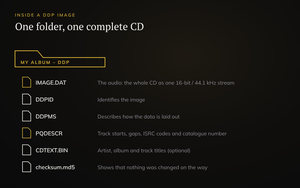
- The audio image (often IMAGE.DAT) – the whole CD as one continuous stream of 16-bit / 44.1 kHz audio, exactly as it will be pressed
- DDPID and DDPMS – small files that identify the image and describe how the data is laid out
- PQDESCR – the subcode: where every track starts and ends, the gaps between them, and the ISRC codes and catalogue number (UPC/EAN), if you have them
- CD-Text (optional) – the artist, album and track titles that some CD players and car stereos show
- A checksum file (often added by the mastering software) – used to verify that no file was changed or damaged on the way
Why not just send a CD-R or WAV files?
A burned CD-R can have read errors, scratches or a burning problem you can't hear, and it has to be shipped. A folder of WAV files leaves it to the plant to work out the running order, gaps and codes – with room for mistakes. A DDP holds everything in one place, exactly as it was approved in mastering, and the checksum shows the plant that the files arrived intact. It can be uploaded instead of posted, and it's the format most plants ask for.
What a DDP isn't for
- Streaming and download stores. Digital distributors want separate high-resolution WAV files, not a DDP.
- Vinyl. Vinyl is cut from its own master, delivered as WAV files per side – see how loud a master should be for why vinyl needs its own master.
- Listening in your music player. You can't just double-click a DDP; you need a DDP player (see below).
How to check a DDP before it goes to the plant
Your mastering engineer should send the DDP along with a way to listen to it – usually a DDP player app, and several of them are free. Open the image in the player and check:
- the running order and the track titles
- that every track starts where it should – no clipped beginnings, no extra silence
- the gaps and transitions between the songs
- the CD-Text and ISRC codes, if you have them
- the whole album from start to finish, once
If something is wrong, ask for a new DDP – don't try to fix it yourself.
Don't touch what's inside
- Never rename, edit or remove any of the files in the DDP folder
- Zip the whole folder before you upload it, so nothing gets lost or changed on the way
- Keep the checksum file with the image and send it along to the plant
- Keep a backup – it's the master of your CD
DDP at Black Sun Audio
At Black Sun Audio, you get a DDP file for CD manufacturing when you master for CD – along with the WAV files for your digital release. Read more about mastering at Black Sun Audio and what mastering is and what it costs, or get in touch.
Further reading
- Bob Katz, Mastering Audio: The Art and the Science (Focal Press)
- Doug Carson & Associates, Disc Description Protocol (dcainc.com)