
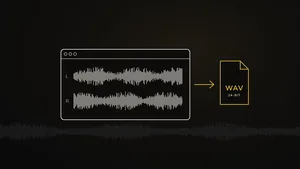
How to Export a Mix for Mastering
Your mix is finished – now it has to leave your DAW in a shape that gives mastering the most to work with. A few wrong settings at this point can undo weeks of mixing: a clipped file, a limiter that can't be removed, a fade that cuts off the last note. Here's how to export a mix the right way, whatever DAW you use.
1. Use a lossless format: WAV or AIFF
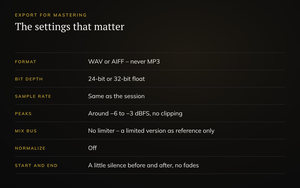
Export a WAV or AIFF file – never MP3, AAC or another lossy format. Lossy files throw away part of the audio to save space, and mastering would only make the damage more audible. Export one stereo file per song.
2. 24-bit or 32-bit float
Export at 24-bit, or 32-bit float if your DAW offers it. 16-bit is for the final CD master, not for the file you send to mastering. A 32-bit float file can't clip even if it goes over 0 dBFS – but don't rely on that: leave headroom anyway.
3. Keep the session's sample rate
Export at the same sample rate as your project – 44.1, 48 or 96 kHz. Converting it on the way out adds nothing; the mastering engineer makes any conversion that's needed at the very end, in one step.
4. Leave some headroom
Aim for the loudest peaks of the mix to land somewhere around −6 to −3 dBFS, and never clip. There's no need to hit an exact number – the point is to leave room for the EQ and compression in mastering. If the plugins on your mix bus are clipping, pulling down the master fader after them won't help; turn down what goes into the mix bus instead.
5. Take the limiter off – but keep your sound
Remove the limiter, clipper or loudness maximizer you used to make the mix sound loud – that's the mastering engineer's job, and a limited mix can't be un-limited. Mix bus compression, EQ or saturation that's part of the sound of your mix can stay on. If you've been mixing into a limiter and love how it sounds, export a second version with it on and label it as a reference.
6. No normalizing, no 16-bit, no fades
- Normalize off. Normalizing changes the level and gives the engineer nothing extra.
- No conversion to 16-bit. Reducing the bit depth – and the dither that comes with it – belongs at the very end of mastering.
- No fade-outs or trimming. Export from a little before the first sound to a little after the last reverb tail has died away, and describe the fades you want – they're made in mastering, after the processing, so they sound smooth.
7. Listen to the export
Before you send anything, play the exported file from start to finish in a media player or an empty project – not in the session. Listen for clicks, cut-off reverb tails, tracks you forgot to unmute and anything else that wasn't meant to be there.
What to send along
- One file per song, with the track number and song title in the file name – for example “03 Song Title – mix v4.wav”
- For an album, the running order and notes on gaps, fades and transitions
- A limited version of your mix as a reference, if you have one you like
- One or two reference records with the sound you're after
- Where the music is going: streaming, vinyl, CD or all of them
- For a CD, the track titles and ISRC codes, if you have them
Quick checklist
- WAV or AIFF, one stereo file per song
- 24-bit or 32-bit float, at the session's sample rate
- Peaks around −6 to −3 dBFS, no clipping
- No limiter on the mix bus – a limited version as a reference only
- Normalize off, no 16-bit, no fades
- Exported file checked from start to finish
Sending your song to someone else to mix instead? Exporting separate tracks for a mix engineer is a different job – see how to export your tracks for mixing. And if you're wondering how loud the final master will be, read how loud a master should be.
Mix ready? Send it for mastering – single tracks from 500 DKK / €68 / $65.
Further reading
- Bob Katz, Mastering Audio: The Art and the Science (Focal Press)
- Bobby Owsinski, The Mastering Engineer's Handbook